
Dental appointment no-shows: how to reduce them in your practice
An empty chair is lost time for the whole practice. Here is why patients miss appointments and which simple steps reduce no-shows, with or without dedicated software.
Every dental practice knows the scene: the slot is booked, the assistant has set out the instruments, the dentist is ready, and the patient neither turns up nor calls. A no-show is more than an empty hour. It is another patient who could have been treated sooner, a treatment pushed back and, often, a team that loses the rhythm of the day.
The good news is that many no-shows can be prevented. Not by telling patients off, but with a simple system applied consistently. Below are the steps that work in many practices, followed by how you can automate them.
Why patients miss appointments
Before looking at solutions, it is worth understanding the reasons. Patients very rarely stay away out of bad faith. The most common causes are mundane:
- Forgetting. The appointment was made over the phone a few weeks ago, and the date never made it into their personal calendar.
- Fear or anxiety. Especially before an extraction or a root canal treatment, some patients put it off until the last moment and then give up.
- Reluctance to cancel. The patient knows they cannot come but does not want to call and explain, so they do nothing.
- A busy schedule. Something comes up at work or at home, and the dentist drops to the bottom of the list.
- No more pain. Once the pain has gone, the check-up or the second session feels less urgent.
Notice that almost all of these causes share one thing: the patient is missing a reminder at the right moment, or an easy way to say they cannot come.
The right reminder, at the right time
A reminder sent the day before solves forgetting for most patients. A few good practices:
- Choose the timing to suit your patients. For morning appointments, a message the previous afternoon gives the patient time to reorganise their day. For those who forget easily, a second message a few hours before can make the difference.
- Keep it short and clear. The practice name, the day, the time, the dentist’s name and the address. No long wording and no advertising.
- Use the channel the patient actually reads. Many patients read a text message straight away. Others prefer email or a WhatsApp message.
- Do not overdo it. Three or four messages for the same appointment become a nuisance and end up being ignored.
Confirmation: turn silence into an answer
A simple reminder informs, but tells you nothing back. A confirmation asks the patient to do something: “Yes, I’m coming” or “I can’t make it, I’m cancelling”. That small step has two benefits. The patient takes ownership of the appointment, and reception finds out in good time which slots may become free.
The easier the confirmation, the more patients do it. A link the patient taps directly from the message, with no account and no password, works far better than “please call us to confirm”. For those who do not confirm, reception can make a short call the day before, just to them rather than to everyone.
A clear and humane cancellation policy
Many patients simply do not know how much notice is polite. Tell them. A simple rule, explained when the appointment is made and repeated in the reminder, helps a lot: for example, asking patients to let you know at least a day in advance if they cannot come.
A few ideas for a balanced policy:
- Put the rule on your website, at reception and in the messages you send to patients.
- Explain why: “The time reserved for you can be offered to a patient who is waiting.”
- Be flexible about genuine situations (illness, emergencies), but keep a note of repeated no-shows.
- For patients who often miss appointments, ask for an explicit confirmation before every visit.
Deposits for long procedures
For treatments that occupy the chair for a long time (an implant stage, extensive prosthetic work, a session lasting several hours), some practices ask for a deposit at booking. The idea is not to penalise the patient but to protect a large block in the diary and any work already ordered from the lab. If you choose this route, set clear conditions (when it is refunded, when it is deducted from the treatment) and check with your accountant how the deposit should be taken and recorded.
Refill freed-up slots quickly
Even with the best reminders, there will be cancellations. What makes the difference is how quickly the free slot goes to another patient. For that you need a list of patients who would like to come sooner: those waiting for a check-up, those who asked for a more convenient time, or those with treatment in progress. We cover this in detail in the article on the waiting list and gaps in the diary.
It is also worth watching for patterns. If certain slots (for example, the first hours on a Monday) see more no-shows, you can book reliable patients or short procedures there.
What a no-show actually costs you
It helps to put your own figure on the problem. Count how many hours stay empty in a month because of no-shows and multiply by the average value of an hour’s work in your practice. The result shows how much it is worth investing in prevention. On our home page you will find a calculator that helps you work this out with your own practice’s figures.
How Stomatik helps you reduce no-shows
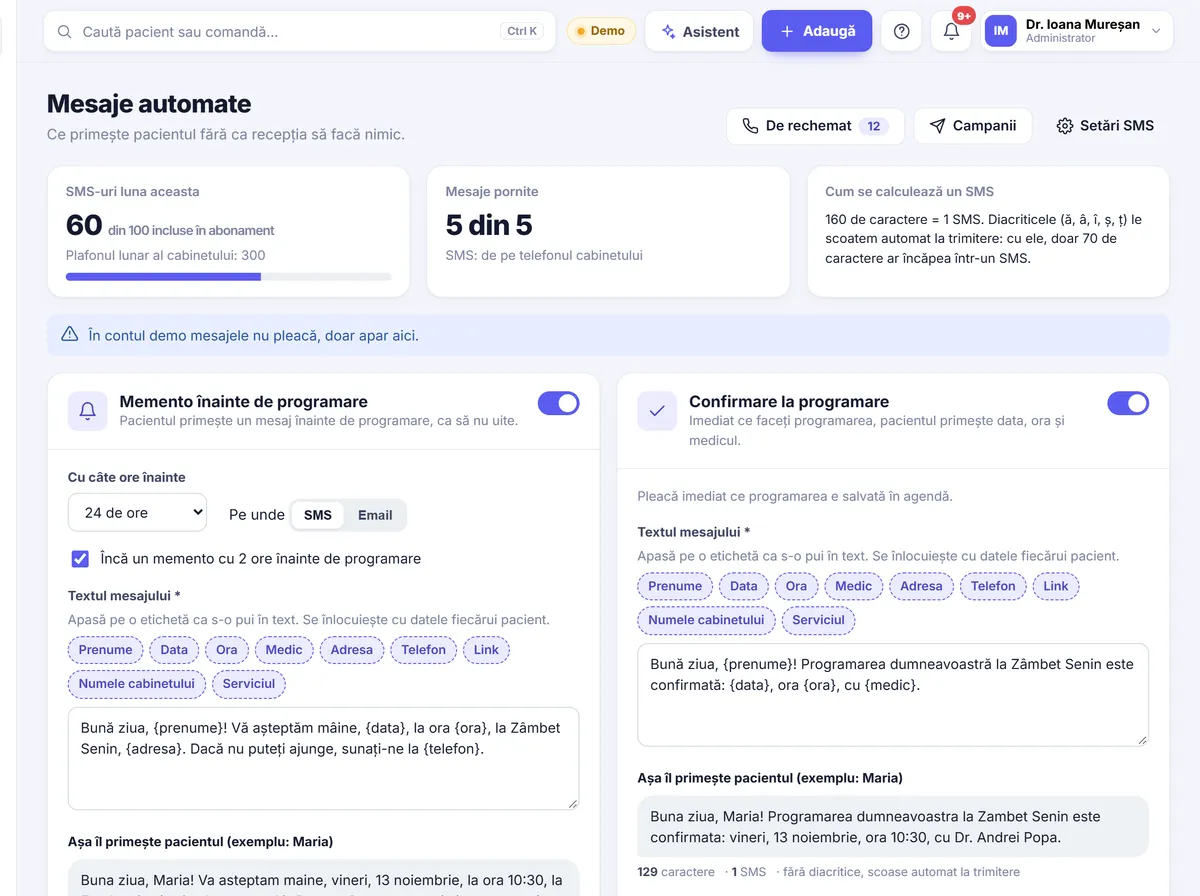
All the steps above can be done by hand, with a phone and a notebook. In practice, though, when reception is busy, reminders are the first thing to be forgotten. Stomatik sends them for you, straight from the Diary.
Reminders by text message and email
The practice chooses how many hours in advance the reminder goes out and, optionally, a second message 2 hours before the appointment. Text messages are sent either through SMSLink.ro or from the practice’s own Android phone, using its SIM card, via an SMS-sending app installed on that phone. If you have not set up text messaging, the reminder goes out by email. The PLUS plan includes 100 text messages a month.
For patients who prefer WhatsApp, the reminder message is prepared in one click and reception presses “Send” in WhatsApp. The message is not sent automatically, so you stay in control.
Confirm or cancel from a link
Each patient receives a personal link, with no account and no password, from which they confirm or cancel their appointment. Cancellation is possible up to a few hours before the appointment, so you have time to react. You will find the details under messages and reminders.
The waiting list, right at the moment of cancellation
When an appointment is cancelled, Stomatik shows you who on the Waiting list can take the free slot, at the same time and with the same dentist. For each waiting patient, the app also suggests the first free slots. Reception no longer searches through the diary and notebooks: they call the right patient straight away.
Online booking, confirmed by reception
Patients who book themselves, from your website, Facebook or Google Maps, choose a time that genuinely suits them, and that matters. The requests arrive in the Diary and reception confirms them. You can read more in our guide to online dental booking.
Stomatik runs in the browser, on a computer, tablet or phone, with nothing to install. Plans start at 99 lei + VAT per month, and all of them come with 30 days free, with no card and no contract. The details are on the pricing page.
In short
- Find out why your patients miss appointments.
- Send a reminder at the right time, on the channel they read.
- Ask for confirmation and make cancelling easy.
- Communicate a clear cancellation policy.
- Keep a waiting list and refill freed-up slots quickly.
See how reminders, confirmations and the waiting list look in a real diary.
Frequently asked questions
How far in advance should I send the reminder?
It depends on your patients. Many practices send a message the day before and, for those who forget easily, another one a few hours before. In Stomatik you choose the number of hours yourself and can switch on a second message 2 hours before.
Can I send the text messages from the practice phone?
Yes. Stomatik can send text messages through SMSLink.ro or from the practice’s Android phone, using its SIM card, via an SMS-sending app installed on that phone.
Does the patient need an account to confirm the appointment?
No. The patient receives a personal link from which they confirm or cancel the appointment, with no account and no password.
Are WhatsApp reminders sent automatically?
No. The message is prepared in one click and reception presses “Send” in WhatsApp. Reminders by text message and email are the ones sent automatically.
Is it a good idea to ask for a deposit for long procedures?
Many dentists do so for treatments that take up a lot of time in the diary or involve lab work. Set clear conditions and check with your accountant how to take and record the deposit.