
Informed consent signed on a tablet: how to do it well
Good consent is clear, specific to the procedure and read without rushing. Here is what that looks like in practice, and how patients sign on a tablet or phone with Stomatik.
Informed consent is one of the documents patients most often sign without reading. They are handed a clipboard just before going in to see the dentist and sign at the bottom of the page. For the practice, a form signed like this gives less peace of mind than it seems.
Good consent is, above all, a conversation: the dentist explains, the patient understands and asks questions, and the document records what was discussed. Below you will find what makes consent genuinely good in practice, what changes when it is signed on a tablet, and how this works in Stomatik.
What makes informed consent genuinely good
Language the patient understands
Medical terms belong in the record, but in the consent form the patient needs to understand what will be done. “Extraction of the lower right wisdom tooth” can be followed by a simple sentence on what that means in practice and how long healing takes. Short sentences and well-spaced paragraphs help far more than small print on a crowded page.
Specific to the procedure
A general form saying “I agree to dental treatment” says very little. An implant, a surgical extraction, a root canal treatment or whitening each have their own risks and recommendations. That is why many practices use a separate template for each type of procedure.
Risks, alternatives and what happens without treatment
The patient should learn the risks of the procedure, what other options exist, and what may happen if they choose to do nothing. For many patients, it is the alternatives that make the difference: they get to choose, not just accept.
Time to read and answers to questions
Consent signed in a hurry, with the anaesthetic already prepared, is not truly informed. Ideally, the patient receives the document before the day of the procedure, or at least has a few quiet minutes to read it. And their questions deserve a direct answer from the dentist, not just from reception.
Details filled in correctly
The tooth, the procedure, the dentist, the date. Blank fields, or fields filled in by hand afterwards, raise questions. Good consent has all the specific details completed before signing.
Paper or digital: what changes
On paper, consent works, but it has a few well-known weaknesses:
- old templates get printed, forgotten in the printer or in a drawer;
- sheets go missing or end up in the wrong file;
- at the end of the day, it is hard to check whether every patient has signed everything they needed to;
- the patient rarely receives a copy.
The digital version does not change the essence, which is the conversation between dentist and patient, but it takes care of the organisation: the template used is always the current one, the signed document goes straight into the patient's record, and the patient can receive a copy. The patient can also read the text on their own phone, at their own pace, with text they can enlarge.
One thing remains to check with your lawyer: in which situations a simple electronic signature is enough for your practice, and how signed documents should be kept.
How to organise consent forms in the practice
Whatever the format, a few habits help:
- A set of approved templates, one for each common procedure, reviewed regularly.
- A single place where the current templates are kept, so nobody uses an old version.
- A clear point in the workflow: the consent form is sent to the patient before the procedure, not at the last minute.
- A quick check: who still has something to sign.
- Keeping it in the record, next to the treatment it relates to.
Common mistakes to avoid
A few situations come up often in practices and are worth avoiding, whether you work on paper or digitally:
- Consent signed after the procedure. It happens on busy days, but the document loses its purpose if it does not come before the treatment.
- One form for everything. A text that tries to cover every procedure ends up explaining none of them well.
- A signature requested by reception, without a conversation with the dentist. Reception can organise the workflow, but medical explanations and answers to questions belong to the dentist.
- The treatment plan changed, the consent form did not. If the procedure changes significantly, it is worth discussing it again and, where appropriate, signing a new document.
- A minor patient, or one with a legal representative. Who signs in these situations is a question to clarify with your lawyer in advance, not on the spot at reception.
A simple example of a good workflow, for a practice with two dentists: the dentist discusses the procedure at the consultation, reception sends the consent form to the patient the same day, the patient reads it at home and comes back with their questions written down, and on the day of the procedure the dentist answers them, the patient signs and treatment begins without pressure.
Consent forms in Stomatik
In Stomatik, consent forms are designed for exactly this workflow. You will also find them described under consent form features.
Editable templates
The practice keeps its own consent templates and can edit them at any time. This way, the texts checked by your lawyer become the templates the whole team uses, and old versions stop circulating.
Fields completed before signing
Templates can have fields to fill in before signing, such as the details of the procedure. The patient sees the complete document, not a form with blank spaces.
Signing on the reception tablet
The practice tablet is linked to the account with a 6-digit code or a QR code, with no complicated installation. Reception sends the consent form to the tablet, and the patient reads and signs it there. The same tablet can also receive the registration form, the medical history questionnaire or the treatment plan. Details under the reception tablet.
Or on the patient's phone
The consent form can also be sent as a link to the patient's phone. This is the right option when you want the patient to read the document at home, before the procedure, without rushing. The link can also be prepared for WhatsApp in one click, and reception just presses “Send”.
Signed PDF in the record and a copy by email
Once signed, the document is kept as a PDF in the patient's record, and the patient receives a copy by email. When you need it, you find it in seconds, alongside the rest of the history.
The status of each consent form
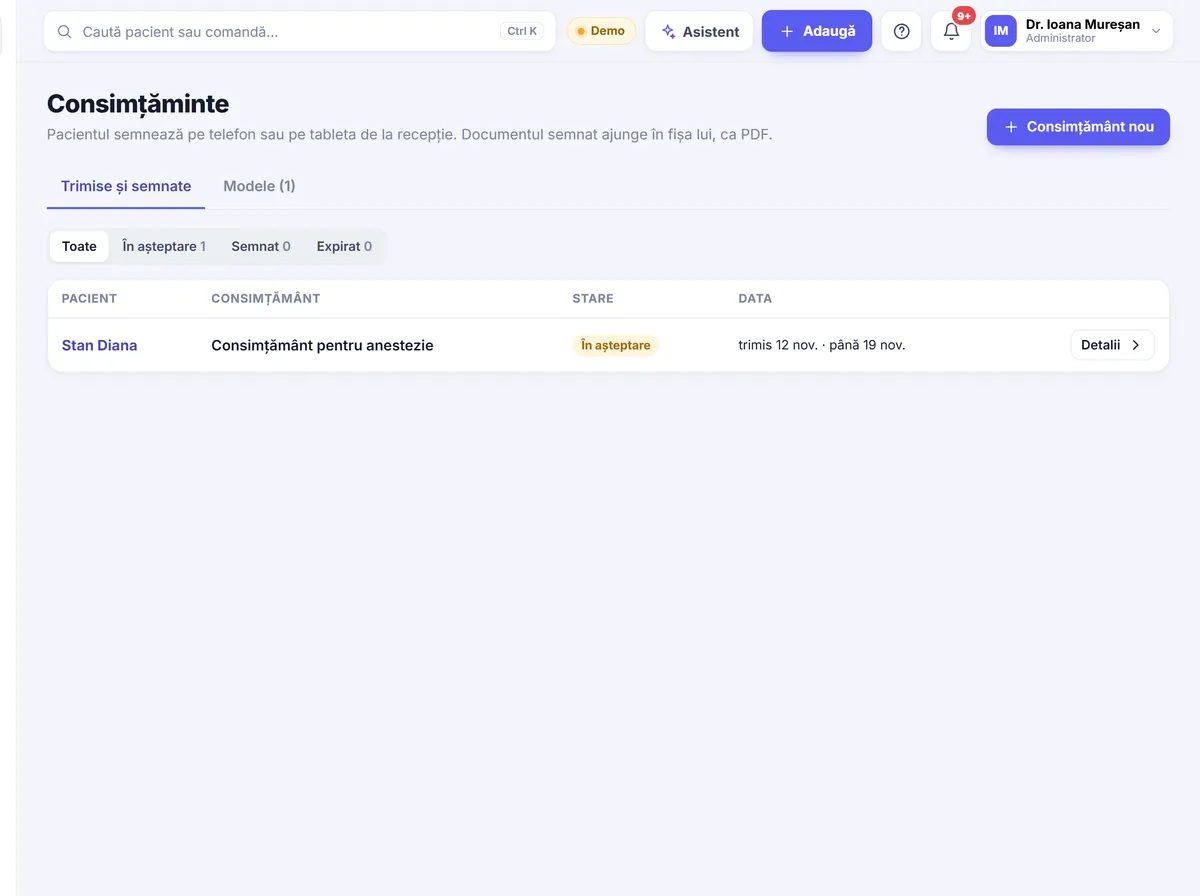
Each consent form has a clear status: pending, signed or expired. So you can see straight away who has not signed yet and follow up in time.
What the workflow above looks like in Stomatik
After the consultation, reception opens the patient's record, chooses the template for the procedure, fills in the fields and sends the link to the patient's phone. The status shows as “pending”. If the patient has signed at home, the document is already in the record on the day of the procedure. If not, reception sends it to the tablet, and the patient reads it in the waiting room and signs before going in to see the dentist.
The signing pages for patients are available in Romanian, English and Hungarian, which helps with patients who do not speak Romanian. Printed medical documents remain in Romanian.
The same way of working exists for treatment plans: the patient chooses an option and signs on their phone. We wrote about this in our article on treatment plans accepted on the phone.
Send your first consent form to a tablet or phone and see how simple it becomes.
Frequently asked questions
Is consent signed on a tablet valid?
Signing on a tablet is increasingly common in practices, but the legal status of electronically signed medical documents is worth checking with a lawyer, for your practice's specific situation.
Can I use my own consent templates in Stomatik?
Yes. Consent templates can be edited, so the practice can use its own texts, checked by a lawyer.
How is the reception tablet linked to the practice?
The tablet is linked to the practice with a 6-digit code or a QR code. After that, reception can send consent forms, registration forms, questionnaires or plans to it.
Does the patient receive a copy of the signed consent form?
Yes. The signed PDF is kept in the patient's record, and the patient receives a copy by email.
Can patients sign at home, before the procedure?
Yes. The consent form can be sent as a link to the patient's phone, so they can read and sign it at their own pace.
How can I see who has not signed yet?
Each consent form has a status: pending, signed or expired, so you can see straight away what still needs signing.