
How to choose dental practice software: a buyer's checklist
Before you choose software for your practice, go through these criteria: what it must do, which questions to ask and how to test it in real conditions.
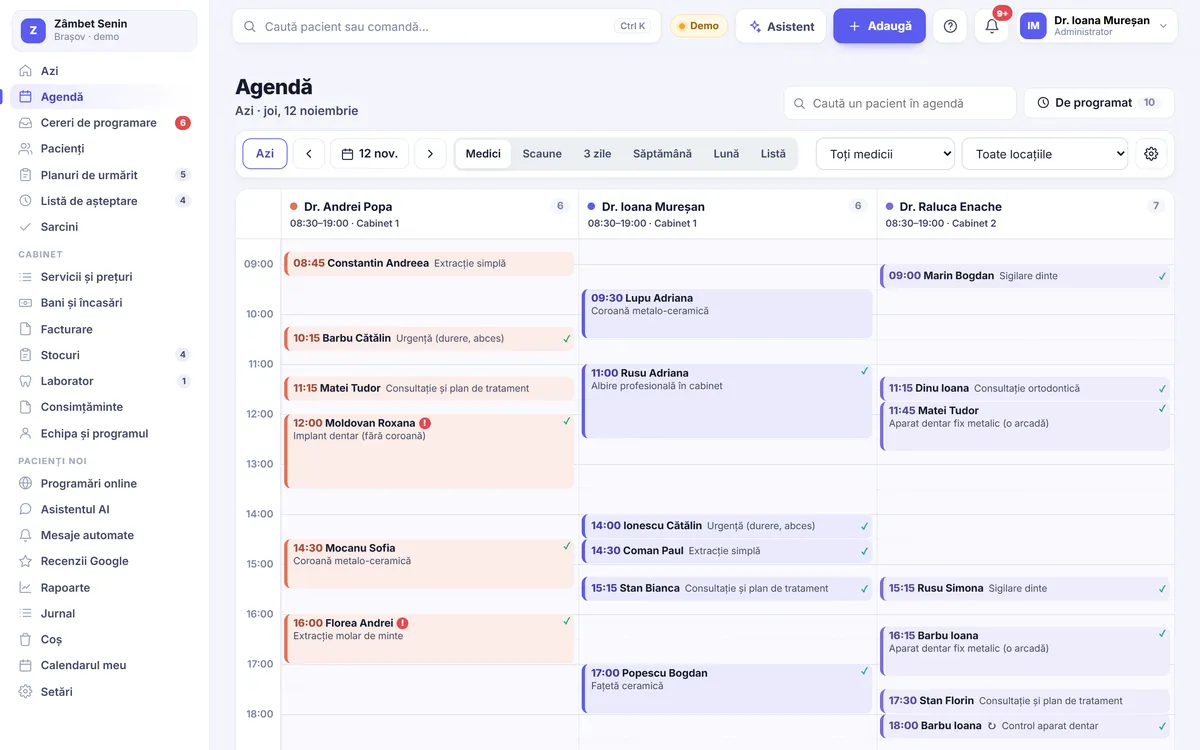
Choosing software for your dental practice is a decision you will live with for years. The whole team will use it every day, and your patients' data will be kept in it. So it deserves a few hours of careful thought, not just a glance at a product page.
Below is a list of criteria you can use for any software you are considering. For each criterion, we suggest the concrete questions to ask. At the end, we briefly show how Stomatik answers each point, so you can compare fairly.
Before the criteria: what you actually need
Before any demo, write down three things on a sheet of paper:
- How you work today: how many dentists, how many chairs, how many locations, who books appointments, who takes payments.
- What gets in your way most: no-shows, searching for records, invoicing, stock, dentists' commission.
- Who will use the software: just reception, or also the dentists, assistants and the accountant.
With this sheet in front of you, judge each program by your own problems, not by the length of its feature list.
The checklist
1. Where and on what it runs
Is it installed on a computer, or does it run in the browser? Does it work on a tablet and phone? Can a dentist see their diary from home? What happens if the reception computer breaks down?
2. The diary
Can you easily see all dentists and all chairs? Can you move an appointment by dragging it? Can you set each dentist's hours and holidays? Are there reminders for patients, by SMS or email? What happens to a free slot after a cancellation?
3. The patient record and dental chart
Does the record cover medical history, diagnoses, treatments, prescriptions and X-rays? Does the dental chart update from treatments? Can patients fill in their own record?
4. Treatment plans
Can you create plan options, with stages and discounts? How does the plan reach the patient: printed, by email, on their phone? Can you see who received a plan and has not started it?
5. Money and invoicing
Does the software keep track of payments, deposits and balances due? Does it issue invoices? How are invoices sent to e-Factura? Does it work with prices in euros? Does it calculate dentists' commission? On the tax side, always check with your accountant that the proposed workflow suits your practice.
6. The fiscal cash register
Can the software print the fiscal receipt on the cash register you already have? Ask for your specific model to be checked, not a general answer.
7. Communicating with patients
Which messages go out automatically, and through which channel? Can patients confirm or cancel on their own? Is there online booking for your website and social media? Do marketing messages respect the patient's consent?
8. Roles and security
Does everyone on the team have their own account? Can you limit what reception or a visiting dentist can see? Can you see who opened a record? Is there two-step sign-in? Where is the data hosted? For the GDPR side, also talk to your practice's lawyer or DPO.
9. Your data: in and out
Who moves the data from your current software, and how much does it cost? Is there a trial run first? And just as important: can you get your data out of the software if you ever want to leave?
10. Support
Is support available in Romanian? Who answers, and how do you contact them? A team that understands how a practice in Romania works saves you a lot of explaining.
11. Total cost
Look beyond the monthly price: do you pay per dentist or per practice? Are there costs for installation, data migration or training? Which features are in each plan? Is there a fixed-term contract?
12. The trial
Can you try the software for free, with your own data, before deciding? Do you need a card for the trial?
Bonus: reports, stock, lab work
At the end of the month, can you see takings by dentist and by payment method? Can you find out where new patients come from? If they interest you, also ask about materials stock, tracking work sent to the lab, and sterilisation. Not every practice needs all of these from the start, but it is good to know you can use them later without changing software.
Common mistakes when choosing
- The decision made by one person. The software is used mainly by reception and the dentists; their opinion matters.
- Features counted, not used. A long list does not help if everyday tasks are awkward.
- Leaving data migration until the end. It is often the most delicate part; ask about it from the start.
- Hidden costs discovered after signing. Ask for the full price, in writing.
How Stomatik answers each criterion
To make comparison easy, here are Stomatik's answers in brief. You will find a full presentation of the software on the dental practice software page.
| Criterion | Stomatik |
|---|---|
| Where it runs | In the browser, on computer, tablet and phone, with nothing to install. iPhone and Android apps are coming soon to the App Store and Google Play. |
| Diary | Day, 3-day, week and month views; drag to move and extend; dentists' hours, holidays, chairs, multiple locations; waiting list for free slots. |
| Reminders | SMS (via SMSLink.ro or from the practice's Android phone) and email; a link the patient uses to confirm or cancel. |
| Patient record and dental chart | Record filled in by the patient on phone or tablet, medical history, prescriptions, X-rays; 2D and 3D dental chart, perio chart. |
| Plans | Options, stages, discounts; the patient chooses and signs on their phone; the “Plans to follow up” list. |
| Money and invoicing | Receipts, deposits, cash book, prices in euros at the BNR exchange rate; invoices and sending to e-Factura once the connection with ANAF is authorised, or via SmartBill / Oblio; dentists' commission. |
| Fiscal cash register | Receipt printed on the practice's cash register, for registers that work with FiscalNet or DxPrint, or via SmartBill; we check your register model together. |
| Reports and the rest | The month's report written in sentences, takings by dentist, payment method and location, new patients and where they came from, export to Excel; stock by batch, lab work, sterilisation. |
| Roles and security | Roles and permissions for each person, activity log, encrypted personal identification number, two-step sign-in, hosting in the EU. |
| Your data | We move your data from your current software ourselves, free of charge, with a trial run first; the patient list can be exported. |
| Support | The Suif Grup team, in Romanian. |
| Cost and trial | From 99 lei + VAT per month, no contract; 30 days free, no card required. |
Useful details before you decide
The features are the same in every plan. START (99 lei + VAT per month), PLUS (199 lei + VAT per month) and COMPLET (449 lei + VAT per month) differ in the extra services, for example the AI assistant on your website, included SMS messages or social media posts written by our team. All the details are on the pricing page.
Moving your data. Patients, appointments, treatments, payments and balances can be moved from Excel/CSV or from your old software's database, without duplicate patients. You can see how it works on the switching from other software page and in our article on moving patients from your old program.
A real trial. During the 30 free days you can work with your team on real situations, exactly as in the tip above. If you would rather see the software with us first, you can book a demo.
Put Stomatik through the checklist above with your team, during a 30-day trial.
Frequently asked questions
What matters most when choosing software for a dental practice?
That it solves your team's everyday problems: the diary, the patient record, money and communication with patients. Test it with reception and the dentists, in real situations, before you decide.
Is browser-based software better than installed software?
It depends on the practice, but browser-based software works from any computer, tablet or phone and does not depend on a single reception computer.
Who moves the data from my old software to Stomatik?
The Stomatik team moves it, free of charge, with a trial run first, from Excel/CSV or from your old software's database.
Do I have to sign a contract for Stomatik?
No. Plans are monthly, with no contract, and the first 30 days are free, with no card required. The free new website comes only with a 12-month commitment, on PLUS or COMPLET.
Does Stomatik work with my fiscal cash register?
Receipts can be printed on registers that work with FiscalNet or DxPrint, or via SmartBill. We check your register model together.
What is the difference between the Stomatik plans?
The software is the same in every plan; what differs are the extra services, such as the AI assistant on your website, included SMS messages or posts written by our team.