
How to get Google reviews for your dental clinic
New patients read reviews before they call. Here is how to ask for reviews naturally, how to reply to criticism and how to hear about an unhappy patient in good time.
When someone searches for “dentist” in their town, the first things they see are the map, the practices’ ratings and a few reviews. For many new patients, these are their first impression of your clinic, before your website and before the first phone call. An excellent practice with few reviews can look less trustworthy than one with plenty of recent opinions.
The paradox is that happy patients rarely write a review on their own initiative. They go home pleased and forget. Unhappy patients, on the other hand, are more likely to make the time to write. That is why reviews do not come by themselves: they need to be asked for, tactfully and at the right moment.
Why reviews matter for a dental practice
- Trust. A patient who does not know you is looking for signs that they can trust you. Reviews written by other patients are among the most convincing.
- Visibility on the map. A Google profile with recent reviews and replies from the practice shows that the business is active.
- Information for you. Reviews tell you what patients appreciate (a gentle dentist, punctuality, clear explanations) and what bothers them (waiting times, parking, unclear prices).
When and how to ask for a review
Timing matters. The best moment is straight after a successful visit, while the patient still feels relieved and satisfied. A few good situations:
- at the end of a successfully completed treatment;
- after an emergency has been resolved, when the patient came in with pain and leaves at ease;
- when the patient thanks you spontaneously, at reception or by message.
How to ask:
- Personally and briefly. “It would help us a lot if you could say in a few words how your visit went.” No long explanations.
- Make it easy. Give the patient the direct link to the review page or a QR code they can scan with their phone. Every extra step loses people.
- No pressure. The patient must feel free to say no.
- Not everyone, not every time. A patient who comes often does not need to be asked after every visit.
Who asks for the review? A simple split usually works well: the dentist says at the end of the treatment that the patient’s opinion matters, and reception offers the link or QR code at payment. The patient hears the request from the person they trust and gets the easy route from the person who handles the details. Agree a short form of words together that the whole team uses in the same way.
Do not buy or invent reviews
It may look like a shortcut: a few reviews written by friends or staff, or bought online. It is not worth it. Fake reviews can be removed, the profile can be penalised, and a patient who discovers that reviews were invented loses trust in everything the clinic says. On top of that, fake reviews hide exactly the information you need: what patients really think.
The safe route is slower but solid: many satisfied patients, asked politely, at the right moment.
Use reviews with your team
Reviews are not only for new patients. Read together with the team once a month, they show what is going well and what is worth improving. If several patients praise an assistant’s patience, let them know. If several complain about waiting in the reception area, perhaps appointments are booked too tightly. Praise the people mentioned in good reviews publicly, and treat repeated criticism as a task to work on, not as an attack. That way, the team starts to see reviews as a useful mirror of its work, and patients notice the difference at their next visit.
How to reply to negative reviews
Sooner or later, every practice receives a negative review. How you reply often matters more than the review itself, because future patients read the reply too.
- Do not reply in the heat of the moment. Wait a few hours, talk to the team and find out what happened.
- Thank the person for the feedback, even if it seems unfair to you.
- Reveal nothing clinical. Do not publicly confirm that the person is your patient, and do not mention treatments, diagnoses or details from the patient file. Medical confidentiality and data protection apply here too.
- Move the conversation to a private channel. Invite the person to call or write to the practice directly, so you can clear things up.
- Stay calm and professional. A composed reply says more than any praise.
An example reply: “Thank you for writing to us. We are sorry your experience was not what you expected. Please contact us on the practice number so we can discuss it in detail.” If you are unsure what you can say publicly, ask your lawyer or data protection officer.
Hear about dissatisfaction before the review
The best negative review is the one that never gets written, because the problem was solved in time. If you ask the patient after the visit how it went, you find out early what did not go well and can call them before their frustration ends up online.
How Stomatik helps you get Google reviews
Stomatik makes the review request a natural step after the visit, without reception having to remember it every time.
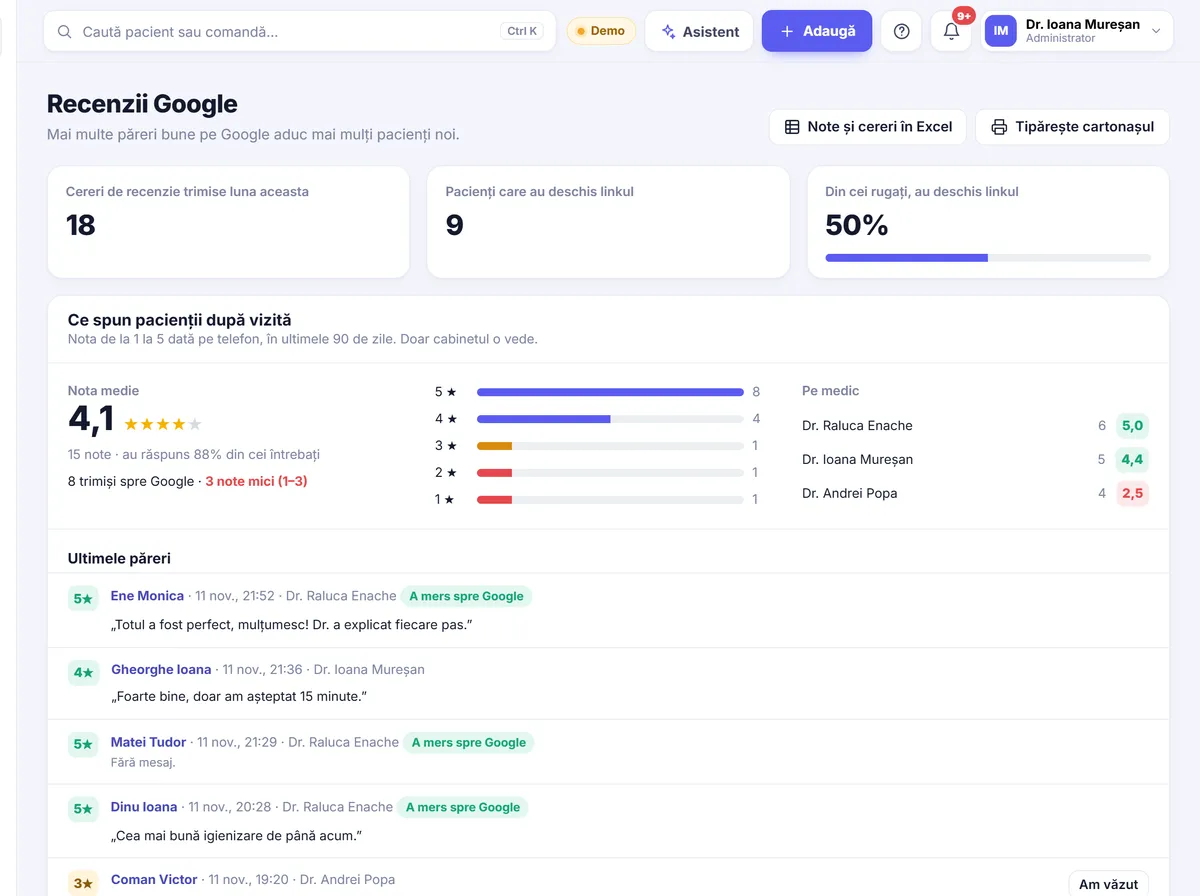
A rating from 1 to 5 after the visit
After the visit, the patient is asked “How was your visit today?” and gives a rating from 1 to 5. Patients who give 4 or 5 get a button to the practice’s Google review page, so they can leave a review in one click while the impression is fresh.
Complaints go to the lead dentist
Patients who give a rating from 1 to 3 are passed to the lead dentist, so the problem can be resolved directly with the patient. You find out in time what went wrong and can react, instead of learning about it from a public review.
Only with consent, and not too often
The review request goes only to patients who have given their consent, and at most once every few months for the same patient. Loyal patients are not bothered after every visit.
A QR code card for reception
For patients who want to leave a review on the spot, Stomatik gives you a card with a QR code to place at reception. The patient scans the code with their phone and goes straight to the right page. The patient’s rating on the way out can also be collected on the reception tablet.
The automatic Google review request and the QR code card are included in the PLUS plan, at 199 lei + VAT per month, together with 100 text messages a month and the AI assistant on your website. The details are on the pricing page. Good reviews help most when patients can find you easily online; we have written about this in our guide to the dental clinic website and in the one on online booking.
In short
- Ask for reviews straight after a successful visit, briefly and without pressure.
- Make them easy: a link or a QR code.
- Do not buy, invent or reward reviews.
- Reply calmly to public criticism, with no clinical details.
- Ask patients how their visit went, so you learn early what did not go well.
Let Stomatik ask patients how their visit went and send the happy ones on to Google.
Frequently asked questions
Can I offer a discount to patients who leave a review?
It is not recommended. Google’s rules prohibit reviews incentivised by benefits, and such a practice can harm your profile and your patients’ trust.
When is the best time to ask for a review?
Straight after a successful visit, while the patient still feels satisfied: at the end of a treatment, after an emergency has been resolved or when they thank you spontaneously.
How should I reply to a negative review?
Calmly, once you have found out what happened. Thank the person for the feedback, mention nothing clinical and invite them to talk directly with the practice.
What happens in Stomatik if a patient gives a low rating?
Patients who give a rating from 1 to 3 are passed to the lead dentist, so the problem can be resolved directly. Only those who give 4 or 5 get the button to the Google review.
Which plan includes the Google review request?
The automatic Google review request and the QR code card for reception are included in the PLUS plan, at 199 lei + VAT per month.