
e-Factura for dental clinics in Romania: a practical guide to getting organised
What e-Factura and SPV mean for a dental clinic in Romania, how to organise your invoicing without stress and how invoices reach SPV directly from your practice software.
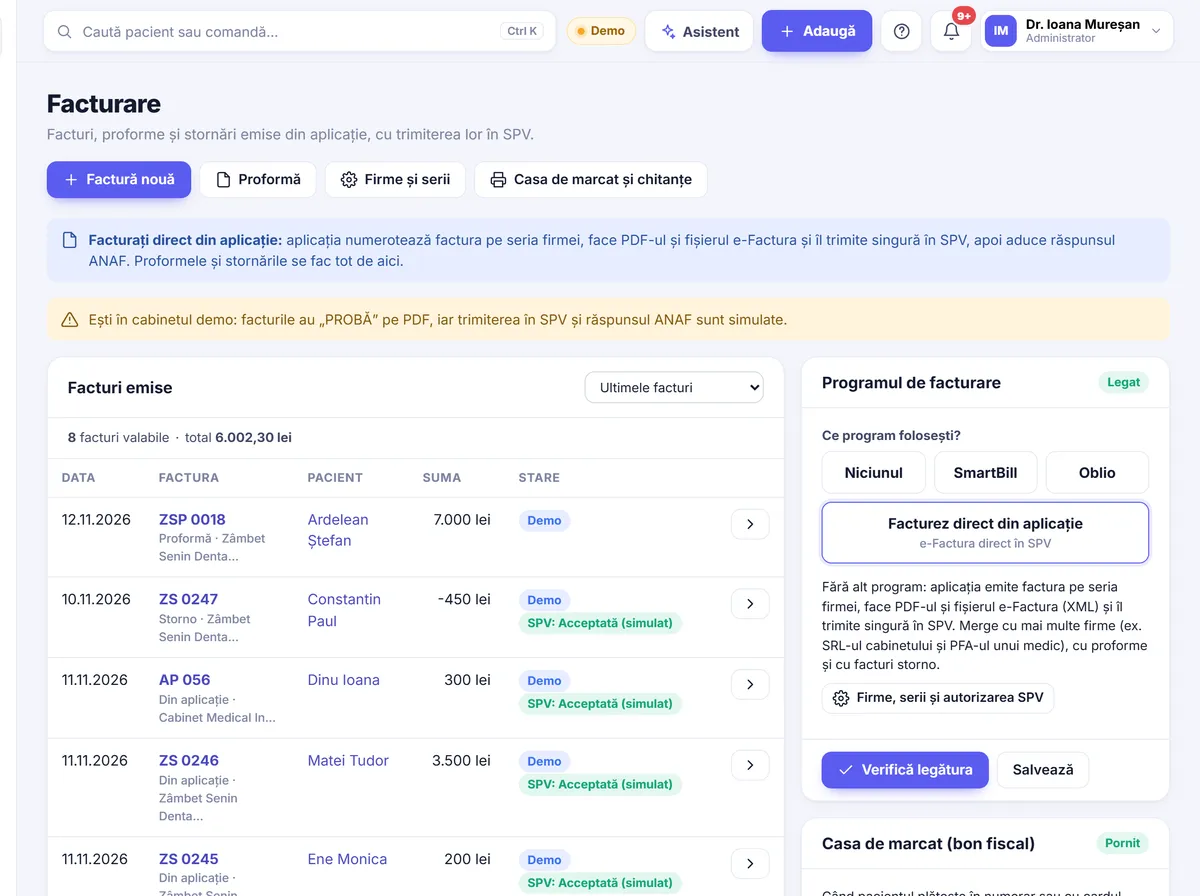
For many dentists, invoicing was for a long time something that “reception sorts out” or “we’ll ask the accountant”. In recent years, though, the rules have changed, and e-Factura has become a topic in almost every clinic. This article explains in plain terms what e-Factura and SPV mean for a dental clinic, how to organise yourself so you don’t lose time, and how software that sends invoices directly can help.
e-Factura and SPV in brief
e-Factura is the national system through which invoices are sent electronically to ANAF. An invoice is no longer just a printed document or a PDF sent by email, but a file in a standard format that reaches the tax authority’s system.
SPV (Spațiul Privat Virtual) is the company’s online account with ANAF. That is where you see the invoices you have sent, the confirmation or error messages and the invoices received from suppliers.
For a dental clinic, the system usually touches two kinds of situation:
- Invoices to companies (B2B) – for example, when a company pays for an employee’s treatment or when you invoice a collaboration.
- Invoices to private individuals (B2C) – ordinary patients who ask for an invoice for their treatment.
Both categories have been brought into the electronic invoicing rules, in various forms. How they apply in practice, especially alongside the fiscal receipt issued from the cash register, is a conversation worth having with your accountant once, clearly, and then turning into a routine for reception.
Why organisation matters, not just “sending”
Many clinics find that the hard part is not the sending itself but everything that comes before it: incomplete details, mixed-up series, invoices redone by hand. A wrong invoice sent to SPV cannot simply be “deleted”; it is corrected with a new document. That is why getting things in order from the start saves you a lot of corrections.
1. Company and patient details
Check your clinic’s details once (name, tax code, address, bank account) and make sure they are the same everywhere. For corporate clients, the company details must be filled in correctly from the very first invoice. For private individuals, your accountant can tell you which details are needed and what you should not ask for on top.
2. Invoice series
A clear series lets you see at a glance where an invoice comes from. A few options clinics often use:
- one series per company, if the business is split across several legal entities;
- a separate series for a second location, if that is what you agreed with your accountant;
- continuous numbering, with no gaps and no numbers “reserved” by hand.
3. Proforma, invoice and credit note
For larger treatments, a proforma invoice is useful: the patient or the company paying knows the amount in advance, and the final invoice is issued after payment or after treatment. When an invoice is wrong or the treatment has been cancelled, you issue a credit note (factură de stornare) rather than changing the original document. Decide who on the team is allowed to issue credit notes, so there are no surprises at the end of the month.
4. Prices in euros, invoices in lei
Many clinics show prices for prosthetic work or implants in euros. The invoice is issued in lei, and the exchange rate used must be clear and easy to check. Agree with your accountant which rate you use and how it appears on the invoice, so the patient understands the amount.
A simple routine for reception
Invoicing becomes easy when everyone knows what they have to do. An example routine for a clinic with two dentists:
- When booking, reception checks whether the patient will want an invoice made out to a company and notes the company details.
- At the end of the visit, payment is taken and the document agreed with your accountant is issued: fiscal receipt, invoice or both.
- Invoices are sent to SPV on the day they are issued or on a fixed schedule, not “when we have time”.
- Once a week, someone checks for error messages and fixes the cause.
- At the end of the month, the accountant receives the list of invoices, credit notes and payments.
The core idea: the same details are entered only once. Every manual copy from one place to another is a chance for a mistake.
How Stomatik helps with invoicing
Stomatik is online software for dental clinics, used directly in the browser. Invoicing is linked to the patient record and to payments, so details are not written twice. You can find more on the invoicing and documents page.
Invoices, proformas and credit notes in one place
From the app you issue invoices, proforma invoices and credit notes. The treatments carried out and the patient’s payments are already in the record, so the invoice starts from what was actually done, not from a list typed out again.
Several companies and several series
If the clinic’s business is split across several companies or you need different series, you set them up in the app and choose, when issuing, which company and which series the invoice is made under. This is especially useful for clinics with several locations or with the business split across several entities.
Prices in euros, invoices in lei at the BNR rate
You can keep prices for treatments in euros (or another currency). Invoices are issued in lei, and the BNR (National Bank of Romania) exchange rate used is shown on the invoice, so the patient can see clearly how the amount was reached.
Sending to SPV
You have two options, depending on how you already work:
- Directly from Stomatik to SPV (e-Factura), once the clinic authorises the app’s connection to ANAF. The clinic does the authorisation itself, once, with its own login details.
- Through the clinic’s SmartBill or Oblio account, if invoicing is already organised there and your accountant prefers to keep it that way.
The full list of connections with other services is on the integrations page.
Everything linked to payments
The invoice does not sit apart from the money. Cash receipts, deposits and the cash book are in the same app, and reports by payment method show you at the end of the month what was taken and how. Your accountant gets a clear picture, without spreadsheets put together by hand. There is a dedicated role for the accountant’s access, with permissions you decide.
If you are switching from another program
If you already use a program for patients and invoices, you don’t have to start from scratch. Patients, treatments, payments and balances can be moved across, and we do the move for you, free of charge, after a trial run. Details are on the switching from other programs page.
In short
- e-Factura and SPV cover invoices to companies as well as to private individuals, in forms that have changed in recent years; your accountant confirms what applies to you.
- Order matters: correct company details, clear series, credit notes instead of changes.
- A fixed routine at reception saves many corrections at the end of the month.
- In Stomatik, invoices, proformas and credit notes start from the patient record and reach SPV directly or via SmartBill / Oblio.
See what invoicing linked to the patient record looks like, with sending to SPV, on a sample clinic’s data.
Frequently asked questions
Do I also have to send invoices to private patients through e-Factura?
The rules for invoices to private individuals have changed in recent years. Your accountant will confirm exactly what applies to your clinic.
Can I send invoices to SPV directly from Stomatik?
Yes, once the clinic authorises the app’s connection to ANAF (the Romanian tax authority). Alternatively, invoices can go through the clinic’s SmartBill or Oblio account.
How do I correct a wrong invoice?
The original invoice is not changed; you issue a credit note and then, if needed, a new, correct invoice. Stomatik lets you issue credit notes.
Can I have prices in euros?
Yes. Prices can be in euros or another currency, and the invoice is issued in lei, with the BNR (National Bank of Romania) exchange rate shown on the invoice.
Our clinic has two companies. Can we invoice separately?
Yes. In Stomatik you can set up several companies and several series and choose, when issuing, which company the invoice is made under.