
The digital dental chart: what your odontogram should show
The dental chart is the map of your patient's mouth. Here is what it should record, what the digital version adds, including the perio chart, and how it looks in Stomatik.
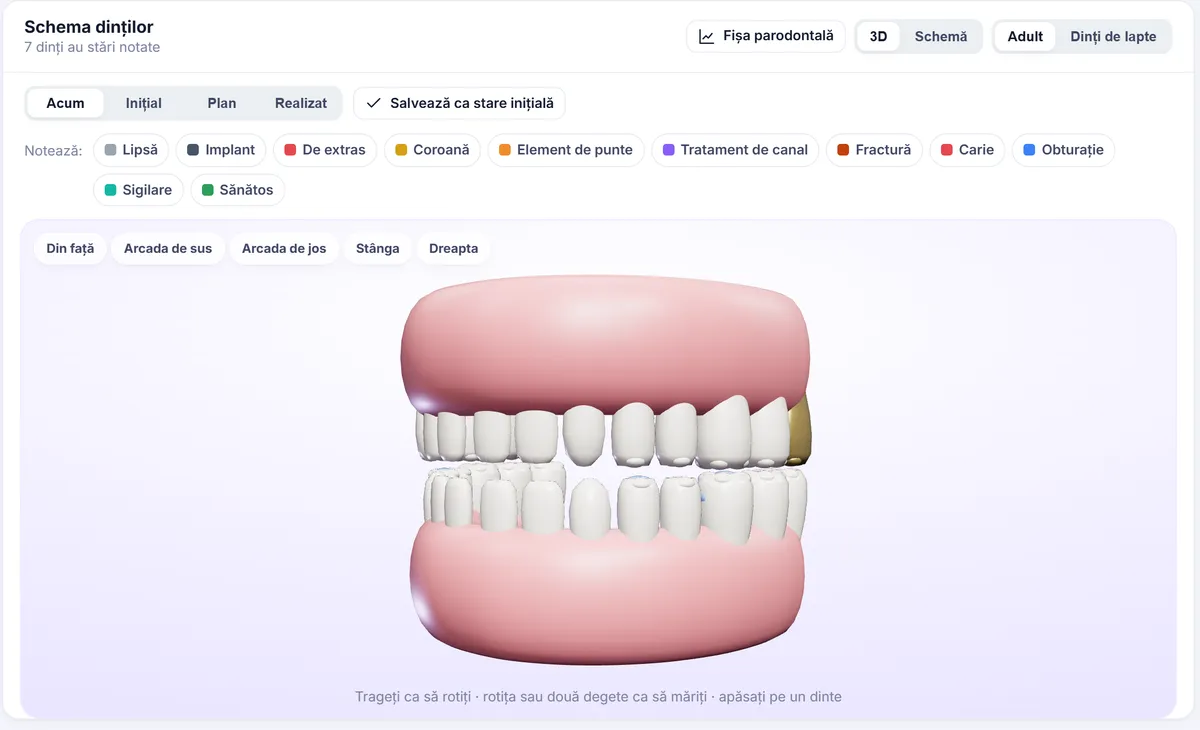
The odontogram, or dental chart, is probably the most consulted part of a dental record. At a glance, the dentist can see which teeth are missing, what work is in place, what needs treating and where. For the patient, the same chart can become the clearest explanation of their treatment plan, as long as it is kept up to date and easy to read.
In this article we look strictly at the dental chart: what it should record, what you gain by keeping it digitally, what the perio chart looks like and how the chart helps in your conversation with the patient. For the rest of the record (medical history, prescriptions, documents), there is a separate guide to the patient record in dentistry.
What a dental chart should record
A useful dental chart quickly answers the question “what is the state of each tooth right now?”. In practice, that means at least:
- Teeth present and teeth missing, including extractions done at the practice or elsewhere.
- Existing work: fillings, crowns, bridges, implants, root canal treatments.
- Diagnoses for each tooth: caries, fractures, lesions, mobility.
- What still needs doing, kept separate from what has already been done.
- The date each item was recorded and the dentist who recorded it.
With children there is an extra detail: baby teeth and permanent teeth exist side by side for a while, and the chart must be able to show both dentitions without confusion.
A good rule is for the chart to describe the real situation today, not a collection of notes built up over the years. A tooth extracted two years ago should no longer appear with the filling it had before.
Paper or digital: what actually changes
A paper chart has the advantage of simplicity: a pen and a drawing everyone knows. The problems come with time:
- after a few years of treatment, the drawing becomes crowded and hard to read;
- symbols differ from one dentist to another, and the colleague who takes over the patient has to decipher them;
- it is hard to see what has changed from one visit to the next;
- the chart and the invoiced treatment live separately, and what has been done is not automatically reflected on the drawing.
A digital dental chart mainly solves the link between treatment and chart: when work on a tooth is recorded, the chart is updated. The whole team uses the same symbols, and the chart can be opened from any computer or tablet in the practice. It is not a guarantee of quality in itself, since that still depends on how carefully the dentist records things, but it removes many of the small day-to-day inconsistencies.
The perio chart: the part most often forgotten
Many dental charts focus on the teeth and leave the gums aside. For patients with periodontal problems, though, how things change over time is the most valuable information. A perio chart usually records:
- periodontal pocket depth, at several points around each tooth;
- gingival recession;
- bleeding on probing;
- the presence of plaque;
- tooth mobility;
- furcation involvement on multi-rooted teeth.
On paper, these measurements are numerous and hard to compare. Their real value shows when you put two examinations side by side and see what has improved and what has got worse. For the patient, this comparison is often the most convincing reason to keep up with treatment and with their oral hygiene at home.
The dental chart as a tool for explaining treatment
Patients do not see what the dentist sees in their mouth. A clear drawing on screen helps them understand:
- Where the problem is: “this is the tooth that hurts, and next to it is the one with the old filling”.
- What comes next: the teeth to be treated, marked differently from the healthy ones.
- Why the order matters: why we start with one tooth and not another.
- What has already been done: at later visits, the patient sees the progress.
A three-dimensional view that can be rotated and zoomed is especially helpful for patients who are not familiar with the classic chart. Instead of tooth numbers, they see a dental arch they recognise.
Habits that keep the dental chart up to date
Whether you work on paper or digitally, a dental chart is only as good as it is consistently completed. A few habits help a lot:
- A full examination at the first visit. Even if the patient comes in for a single tooth, a complete chart from the start avoids surprises later and gives you a starting point for comparison.
- Recording on the same day. What is not noted straight after treatment is often noted incompletely, or not at all.
- Keep “to do” clearly separate from “done”. A tooth marked for treatment must not be confused with one already treated.
- The same conventions for the whole team. In a practice with several dentists, shared symbols and terms make the chart easy for a colleague to pick up.
- Work done at another practice. Record that too; for the dentist taking over the case, it matters just as much.
- Regular review. At routine check-ups, a quick look over the whole chart confirms it matches the real situation.
For a practice moving from paper to digital, it is also worth deciding what to do with the old charts: some practices re-record them at each patient's first visit, others keep the old record as a reference document.
The dental chart in Stomatik
In Stomatik, the dental chart is part of the patient record and is linked directly to treatment. In short, here is what you will find (details under dental chart):
2D and 3D chart
You can work on the classic two-dimensional chart or on a 3D view of the arches, which can be rotated and zoomed. The 3D view is very well suited to explanations for the patient, right on the surgery screen or on a tablet.
Permanent teeth and baby teeth
The chart shows both the permanent dentition and baby teeth, which is useful for practices that treat children.
Diagnoses on each tooth
Diagnoses are recorded directly on the tooth concerned, so the state of each tooth is visible at a glance.
The chart updates from treatment
When a treatment is entered in the record, the chart is updated. You no longer have to draw separately what you have done, and the chart reflects the work carried out. Treatments can also be dictated by voice: the dentist says what they did, the app suggests the treatment lines (tooth, service, price), and the dentist checks them before saving.
Perio chart with comparison
The perio chart records pocket depth, recession, bleeding, plaque, mobility and furcations. Examinations can be compared with each other, so you can see the progress and show it to the patient.
From chart to plan
What you find on the chart becomes the basis of the treatment plan, with options, stages and prices, which the patient can receive on their phone. Plans are described under treatment plans, and the other parts of the record under the patient record.
Everything works in the browser, on a computer, tablet or phone, with nothing to install. This means the dentist can open the chart on the surgery tablet to show the patient, and a colleague who takes over the case sees the same chart with the same symbols. The record also keeps track of who opened or changed the data, and when.
Open a 3D dental chart and see what the plan looks like when explained to the patient.
Frequently asked questions
What is a digital dental chart?
It is the patient's dental chart (odontogram) kept in software rather than on paper. It shows the state of each tooth, the diagnoses and the work done, and it updates as treatment is carried out.
Does the dental chart in Stomatik include baby teeth?
Yes. The chart shows both permanent teeth and baby teeth.
Do I have to draw the treatment I did separately on the chart?
No. In Stomatik, treatment entered in the record updates the dental chart.
Can I compare two periodontal examinations?
Yes. The perio chart records pockets, recession, bleeding, plaque, mobility and furcations, and examinations can be compared with each other.
What is the 3D view for?
The 3D view can be rotated and zoomed, and it is especially useful when explaining to the patient where the problem is and what comes next in their treatment.