
The cash register in a Romanian dental clinic: fiscal receipts without double work
How to organise payments at reception: fiscal receipt or invoice, the daily cash register report and printing the receipt straight from your practice software, without entering the payment twice.
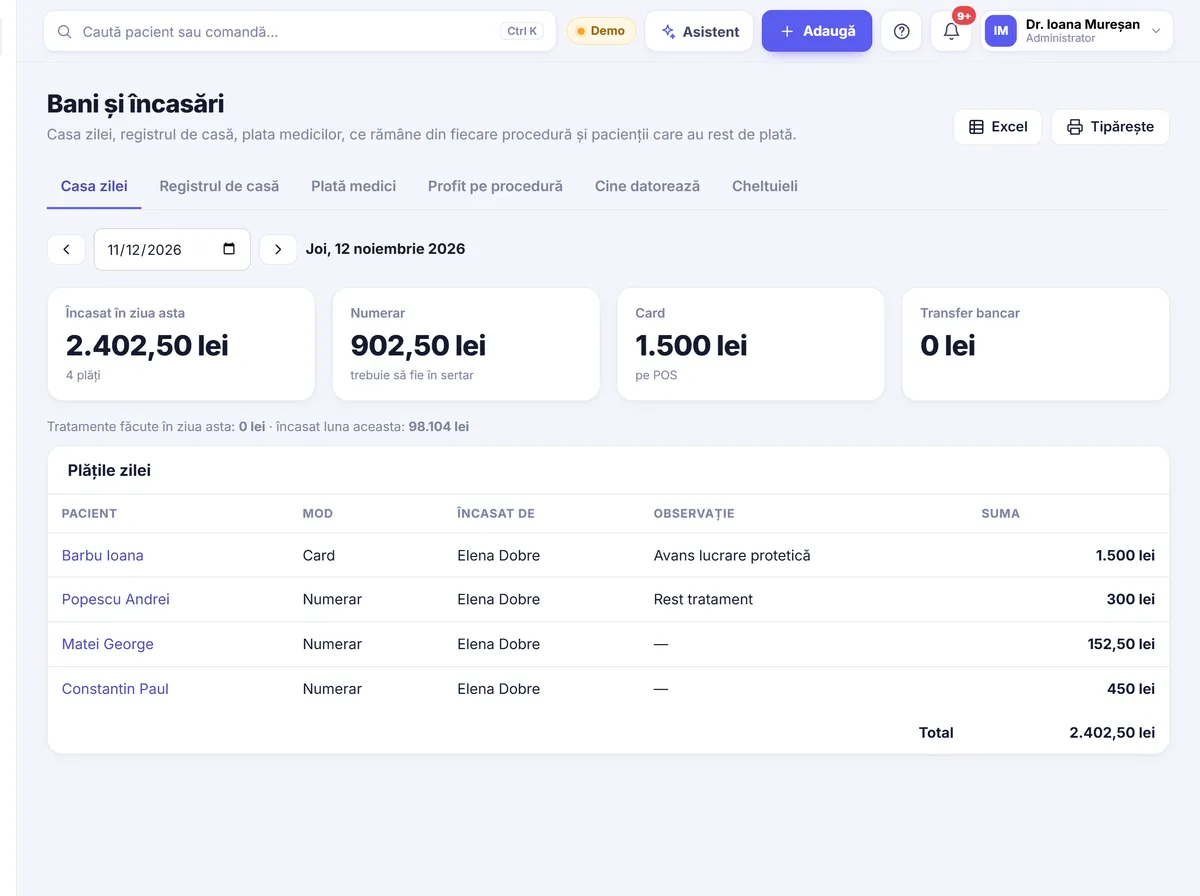
In many dental clinics, payment time looks something like this: the dentist tells reception what was done, reception looks up the price, enters the amount in the software, then types it again on the cash register, and in the evening someone gathers the receipts and compares them with what is on the computer. It works, but it takes time and leaves room for mistakes. In this article we look at how to organise the cash register and fiscal receipts in a dental clinic more simply.
Fiscal receipt or invoice?
This is probably the most common question at reception. As a general rule:
- The fiscal receipt is issued from the cash register, usually when the patient pays on the spot, in cash or by card.
- The invoice is issued when the patient asks for one, when a company pays or when payment is made by bank transfer.
- There are situations where both documents are issued for the same payment, and the right way to link them is something you agree with your accountant.
Our recommendation: ask your accountant for a short written list of the situations that come up often in the clinic (cash payment, card payment, deposit for a treatment, payment by a company, payment in instalments) and which document is issued in each case. Stick the list up at reception. That way, nothing depends on one person’s memory.
The daily routine at reception
A clear routine is the difference between a calm evening and an hour spent hunting for discrepancies. An example for a clinic with two dentists and one receptionist:
In the morning
- Check that the cash register starts normally and has paper.
- If that is what you agreed, note the amount of cash in the till at the start of the day.
- Reception looks at the day’s diary: who has deposits to pay, who has a balance left from earlier visits.
During the day
- Payment is recorded straight after the visit, not “all together at the end”.
- The document (receipt, invoice or cash receipt) is issued for the amount actually taken, not for the total of the treatment plan.
- Deposits for larger treatments are recorded as deposits, so they are deducted correctly from the final payment.
In the evening
- Print the daily cash register report and keep it as your accountant has advised.
- Compare the cash register total with the total of payments recorded in the software, by payment method (cash, card).
- Sort out any differences the same day, while everyone still remembers what happened.
Where the differences come from
When the cash register and the software don’t “match”, the cause is almost always the same: the payment was written down twice, in two different places. A few typical situations:
- a wrong amount was typed on the register, but the amount in the software is correct (or the other way round);
- the patient paid part in cash and part by card, and the split was not entered the same way;
- the receipt was issued, but the payment was not recorded in the patient record, so next time the patient shows as owing money;
- a deposit was recorded as a final payment.
The solution is not “more care” but entering the payment only once: the payment is written once, and the receipt is printed from the same step. That is the idea we follow in Stomatik too.
When several people work at reception
In clinics with several shifts or several people at reception, it is worth deciding who is responsible for the cash register on each shift and who does the evening check. If a payment was recorded incorrectly, the correction is made by the person who recorded it or by a designated person, not by “whoever is free”. That way, every difference has a name and an explanation, and your accountant receives figures that have already been checked at the end of the month.
Cash receipts, deposits and the cash book
Besides the fiscal receipt, many clinics also use other documents related to cash:
- The cash receipt (chitanță), used in certain cash payment situations, usually together with an invoice.
- The deposit, for prosthetic work or implants, where the patient pays in stages.
- The cash book, where cash coming in and going out is tracked.
Here too, your accountant will tell you which documents you need. What matters is that they all start from the same data, rather than being filled in separately.
How Stomatik works with the cash register
Stomatik is online software for dental clinics, used in the browser. Payments are linked directly to the patient record and to the treatments carried out. You can find details about the money side on the money and takings page.
The fiscal receipt on the clinic’s cash register
When reception records the payment, the fiscal receipt can be printed on the clinic’s cash register without the amount being typed in again. The connection works through a small program installed on the reception computer, for cash registers that work with FiscalNet or DxPrint (cash register connection software used in Romania).
Because there are many cash register models, we don’t promise that any one of them will work straight away. We check your cash register model together with you before setting up the connection.
The SmartBill option
If the clinic already uses SmartBill, the receipt can also be issued through the clinic’s SmartBill account. The other available connections are described on the integrations page.
Cash receipts, deposits, cash book
From the same app you issue cash receipts, record deposits for treatments paid in stages and keep the cash book. The clinic’s expenses can be recorded here too.
Prices in euros, payment in lei
If some treatments are priced in euros, the amount is calculated at the BNR (National Bank of Romania) exchange rate, and documents are issued in lei. Reception no longer has to do sums on the phone.
A shorter evening check
Reports by payment method show how much was taken in cash, by card or by other methods, and payments can also be viewed by dentist or by location. The cash total is easy to compare with the cash register report. For invoices and e-Factura (Romania’s national e-invoicing system), see the invoicing page.
Clear permissions for everyone
You can decide who is allowed to change the price of a treatment and who cannot change treatments that have already been paid for. That way, what was taken stays exactly as it was recorded, and your accountant can have their own access, with the accountant role.
In short
- Decide once with your accountant which document you issue (receipt, invoice, cash receipt) in each situation, and write it up at reception.
- The payment is recorded straight away, only once, for the amount actually taken.
- Each evening, the daily cash register report is compared with the payments in the software, by payment method.
- In Stomatik, the receipt is printed on the clinic’s cash register (FiscalNet or DxPrint) or via SmartBill, in the same step in which the payment is recorded.
Try recording a payment, a deposit and a fiscal receipt on a sample clinic’s data, with no double typing at all.
Frequently asked questions
Can I print the fiscal receipt directly from Stomatik?
Yes, on cash registers that work with FiscalNet or DxPrint, through a small program installed on the reception computer. We check the cash register model together with you before setting it up.
Does it work with any cash register?
We don’t promise compatibility with every model. We check your model together with you; as an alternative, the receipt can be issued through the clinic’s SmartBill account.
When do I issue a fiscal receipt and when an invoice?
It depends on the situation and on how the clinic is set up. The safest approach is to ask your accountant for a written list of common situations and the right document for each.
Can I record deposits for larger treatments?
Yes. In Stomatik you can record deposits, alongside cash receipts and the cash book.
How do I check in the evening that payments match the cash register?
Compare the daily cash register report with the payments by payment method report in the software, especially the cash and card totals.